Showing posts with label Java. Show all posts

Wednesday, December 16, 2009

Spring Framework Presentation : A case study of one of my projects

In my current organization Aftek Limited I have used Spring Framework in one of my projects (lets call it as SomeProject since I can't disclose the name of the project!). To smoothen the learning curve I have been asked to present a case study of Spring.

The following PPT is the slightly modified version of the presentation. As usual comments are welcome! :-)

Friday, December 04, 2009

JBoss application server tuning and slimming

In one of my projects I have got some time to play with JBoss to “tune” it. I will rather say to “slim” it!
The project was basically a JEE application involving EJB 3.0 and Flex with BlazeDS. Here are some of the things which I noticed / performed …

  • Use latest version of JBoss (jboss-5.1.0.GA-jdk6 if using Java 6. You would face problems related to web services java.lang.UnsupportedOperationException: setProperty
    must be overridden by all subclasses of SOAPMessage something of this sort if you try to use JBoss 5 with Java 5. Refer: http://www.jboss.org/index.html?module=bb&op=viewtopic&p=4194526 … Thanks Ashwin Shah for figuring out this!)
  • Set following JVM arguments in run.conf.bat
    • set "JAVA_OPTS=-Xms512M -Xmx512M -XX:MaxPermSize=256M -XX:PermSize=256M -XX:ReservedCodeCacheSize=128M"
    • The meaning of above parameters can be found at http://java.sun.com/javase/technologies/hotspot/vmoptions.jsp
    • Above settings are for me and you may have your own values for JVM parameters.
    • To know overall Java memory management or garbage collection search google!
  • Configure log4j as …
    • Use minimum required pattern as
    • param name="ConversionPattern" value="%d{yyyy MM dd HH:mm:ss:SSS}, [%-5p], [%t:%x], %c, %m%n"
    • Use INFO threshold by setting property in run.conf.bat as
    • set "JAVA_OPTS=-Djboss.server.log.threshold=INFO"
    • Disable console logs as
    • just XML comment: appender-ref ref="CONSOLE"
  • Slim web container as
    • If AJP connector is not getting used then disable its "connector" entry from server.xml
    • If only HTTPS is used and not HTTP then disable HTTP "connector" entry from server.xml
  • Remove unused services by removing following files from JBoss default configuration
    • cache-invalidation-service.xml (needed in case of clustered deployment)
    • hdscanner-jboss-beans.xml (hot deployment related)
    • http-invoker.sar (invoking rmi over http)
    • monitoring-service.xml (monitoring alerts)
    • profileservice-jboss-beans.xml (profile service)
    • profileservice-secured.jar (profile service)
    • properties-service.xml (setting jmx properties)
    • quartz-ra.rar (scheduler)
    • schedule-manager-service.xml (scheduler)
    • scheduler-service.xml (scheduler)
    • uuid-key-generator.sar (uuid generator)
  • Remove Jboss timer services (ejb2-timer-service.xml and ejb3-timerservice-jboss-beans.xml) if not using MDB. If the bug https://jira.jboss.org/jira/browse/EJBTHREE-1880 gets fixed then you can remove timer services even if you are using MDB
  • Well there are many more things which can be found at
  • That’s it! (More things coming later … when? Don’t know ;-))

Some explanation on "JVM not able to create native threads":
There is a nice article which talks about this issue: http://www.egilh.com/blog/archive/2006/06/09/2811.aspx

The article summary is as follows
  • Let’s say we have a 32 bit Windows machine with 4 GB of RAM. In 32 bit windows every process has a max limit of 2 GB virtual memory. So the JVM has a max limit of 2 GB.
  • If we have allocated 1.5 GB memory to JVM heap then only 500 MB memory is still available to JVM. Out of this say JVM use 100 MB for other purposes like linking etc then JVM has 400 MB left.
  • In java when we create a thread, java creates a thread object in JVM memory and also creates operating system thread. Now from java 1.5 onward each thread has its own stack of 1 MB.
  • So according to above statistics, JVM is only able to create maximum 400 threads using 400 MB memory left. And if thread count is increased JVM would give an error “unable to create native threads”!.
  • Hence we have to decrease the JVM heap memory size to increase the thread count.
Hope this helps!

Thursday, May 01, 2008

Continuous Integration: Improving Software Quality and Reducing Risk

In November 2007 I attended a conference on Java Technology in Hinjewadi, Pune.
To know more about the conference visit:
Well, there I had attended the presentation on Continuous Integration from Paulo Caroli who is from ThoughtWorks. I was very impressed by the methodology he discussed with us. Then I decided to give it a try in my current project at Aftek. I will write later on my practical experiance about CI. But let me tell you in order to make my team aware of what CI exactly is I had given a small presentation. I though I would be a great idea to share that here on this space.

So here I go ... (and of course yes your suggestions / comments / critics are always welcome)


Saturday, January 26, 2008

RTSJ: Real Time Specification for Java (JSR-1)

Finally I am uploading my presentation on above topic!
Well almost an year and half ago , when DR (my mentor and our SVP Engineering) asked me to read and talk on JSR-1: Real Time Specification for Java (RTSJ), I prepared this presentation. I remember Sunil Desai our SVP Technology Solutions was very keen on embedded Java . That's the reason he suggested DR to explorer more on this topic. And then came me.

Well enough with the history, let me tell you one more thing: Though this presentation is year old why today I am uploading it here / posting it here?
I was basically surprised to know that Googles Blogger (this blogging site / tool) does not allow me to upload presentations / ppts. Because of this reason only I was delaying the posting of my various ppts here! ;-)
Then today I came across a cool website: SlideShare! And my work done!

Notes:
1. My presentation on RTSJ is purely theoretical and I does not have any professional experience in this area. ;-) Though your comments / suggestions / critics are always welcome.

2. I have mentioned DR my mentor and our SVP Engineering. His name is Mr. Dhananjay Kulkarni but he is commonly known as DR. Other than usual technical and management work in IT industry he is also involved in many social activities. He is a Trustee of an NGO named Sanvedana. If you are interested in Sanvedana please visit website http://www.sanvedana.org/ DR can be reached at dhananjayk@sanvedana.org

Here is the the presentation ...

Saturday, October 27, 2007

IndicThreads.com Conference On Java Technology: Day 2

Day 2 was much simpler. Nahar got added to the crew and we had Afteks car ready to commute. We reached on time (though Amit was with us! hehe ... just kidding!)


First session was on Web 2.0 stuff from Ramesh Loganathan who is from Pramati. His talk on bridging the gap between desktop applications and internet application was impressive. He shared some of his good experiences with web 2.0 development. I liked that idea of “Send to Friend who is on gtalk/yahoo/msn” instead of “Send email to friend”. Rather than technology he talked on a new approach towards the product development, new perspective to user interaction (lets call it user interaction instead of user interface as we are in web 2.0! Hmm?)


Next session was from Debu again. He was going to talk on SOA chaos. He was very impressive yesterday so I was expecting the same this time. Though I don’t have any experience of SOA, I had heard about this buzzword many times when I was in CPI. Debu tried his best to keep things simple, but I guess because there was no internet available, he was unable to show any demo. Because of this I guess I was unable to get the real feeling of SOA. Debu was very patient in answering my questions here again. I liked this. I talked about my year old problem of CachedRowset with him. He assured me that he will look into this. I met Madhav Sathe who is working with Debu at Oracle. To be very frank I was very surprised when he talked with me in Marathi! He also said that he will try to help me out in Cached row set issue. Thanks people!


Chris came next to talk on offline Ajax applications. He had given demo of Google Gears. Again because of unavailability of internet he was not able to deliver more. Hopefully Harshad will consider this infrastructural issue next time!


In lunch time, I could not resist myself to go with some non-veg items. Yesterday I was successful in avoiding non-veg but this time sorry! ;-)


After lunch we were expecting some J2ME stuff. But again there is a change in schedule. J2ME session got dropped out and even Advanced Spring session was also not there. Harshad, this was very disappointing ;-)


But then I met Paulo Caroli from ThoughtWorks. He was also impressive in talking on Agile techniques. His sessions on Continuous Integration Technique and Refactoring (to patterns) were very good. Yesterday I missed his session on Unit testing with Dependency Injection and Mock Objects as this session was running parallel to Spring :( I was feeling bad about this. Anyways He said that next time when he will be in pune he will talk on this.


Agile techniques are truly impressive but I guess these will work only if we change our mindset. As per Paulo, they are actually using these techniques in their day to day life which sound encouraging to me. Worth mentioning here is I liked one of his statements “Peer pressure ensures that policies get followed” Very true right? And if we want to go by Agile way automation will be the key to success. So try to automate everything like unit testing, build, integration, use tools to refactor, find bugs etc etc. I have already started towards working out this in Aftek … let’s see how it goes :)


Last session was again dynamic taken by Chris. He talked on GWT. He had shown some demos which were good. About GWT I will just say that: if it works in all the cases then it’s good. Otherwise I will not like that its there to do only simple / small scale java projects. After hearing so much from Chris a question came to my mind: If there are UI technologies like silverlight, flex etc comming up why google is still going with javascript? Any answer (from google?)


This ended up the conference and its now time for quiz winners. Yes Chris was the person who was picking up the lucky chits. Amit was lucky to win 2nd price for 2nd day. Good that Aftek is lucky! And we started our journey back to BM office. Overall it was a good experience hearing from industry experts. Time will tell how we implement this.

Friday, October 26, 2007

IndicThreads.com Conference On Java Technology: Day 1

Oh no! I have to wake up very early tomorrow … When? … Before 6 am. Yes it’s very early if you compare with my existing schedule. But can’t help as tomorrow I have to attend a Java conference at Hinjewadi…. Thoughts like these were there in my mind one day before the conference. And sad thing was that it was a Kojagiri night. (You can read more about funny item we gave that night here).


Yes! I made it. I was there in BM office at around 7:30 AM. Thanks to Smita! She performed better than Nokia clock-Alarm :) And we left towards Hinjewadi on our bikes.


Symbiosis campus is just amazing! Needless to say that I recalled my PICT days and of course InC days to mention explicitly. After registration we had a breakfast which was good. And now let’s go to the sessions!


Okay okay … before going into each and every sessions details let me tell you that there was a Java Quiz also. And I am proud to say that we attempted correct answers on day1 and day 2 as well. I will write about the prizes in my next write up.


Our first session was from Prayank Swaroop who was from Adobe. He talked on Rich Internet Applications and Flex. He was amazing in his presentation. He had shown us the demo of FlexBook which was truly jaw dropping! As a result of this once the session got over we started discussing can we use Flex in dhg-web? :)


As there was a change in schedule for some sessions we attended Spring tutorial by Peter Thomas from Satyam. I found Thomas a true lover of Spring. After every 10 mins he was asking to use Spring. Couple of his dialogs were too interesting: “Don’t create custom frameworks anymore use Spring”, “Don’t use singleton anymore, don’t use new() in your code … use Spring”, “Spring has ended up killing EJBs”, “Hibernate people say don’t use Spring” etc etc. Long back I heard about Spring from Chirag V. I did not know Spring but Peters session has given me good overview of Spring. Now I am planning of going through it.


Lunch Time! Worth mentioning … of course if Preetam will not talk about food then who will talk? ;-) Had (a little because have to attend next sessions also!) good food. Have I mentioned that I met some of my old Dhankawadi friends there? Oh yes, very surprisingly I met Nilesh Birajdar and Bharat. Nilesh was in BVP, one batch junior to me and we were living very nearby @ IIT-D (it’s not IIT Delhi but its IIT Dhankawadi … needles to say we call the campus of BVP+PICT as IIT-D. hahaha!). Bharat was junior to me in PICT. Also I met Ashish who was used to say in my next Apartment @ Nagar. Surprisingly all these people are from Reflexis. Good to see you guys there!


After lunch we were under impression that now we will be witnessing the traditional “M$ Vs Java” war! But the speaker (I forgot the name of the speaker who was from Microsoft) didn’t touch that aspect at all and talked about the interoperability! Very good. Instead of fighting if we join the hands then we can deliver more; hmm? He talked on Office Open XML format and told us, how Microsoft office technologies can be integrated in Java platform. He also had given a small demo on Web services which was very basic: a “Hello World” web service. Further he had shown some good demos of Silverlight. At the end (no need to say) we impressed by Silverlight!


Next session was amazing! A well-known personality from EJB3 world : Debu Panda talked on “Spring and EJB3”. Wow! This is the stuff for which I was waiting for! Debu had given a precise comparison of these two technologies and very satisfactory answers to some of my questions. One question I would like to mention here: “Debu, what you say what will be there after 5 years EJB / Spring / Something else” Controversial question. And Debu answered it safely: “EJB will be there as an average project has a lifetime of at least 5 years. So EJB will be there.” He didn’t talk about Spring but said technologies will keep coming. Anyways safe answer! But I guess DR will have some better some philosophical answer to this! Debu is not only a HiTek personality but does good marketing also. I end up purchasing his book “EJB3 in Action”. Debu signed on it for me. Debu what about starting a “Debu Panda Signature Book” series? (Just like Martin!) :)


Meanwhile Preeti and Smita attended session on Wicket. They said it’s a component based server side framework for UI. That’s it. Even I don’t know about it. Will find out more about this afterwards :)
Ha forgot to tell one sad thing. After lunch Meenal was not feeling well so we asked her to go home. Next day Amit attended instead of her.
Tea Break: Though it’s not possible to get 4minar style tea here but anyways I had it ;-)


Chris Schalk from Google talked next on JSF and Ajax. He was good. Shown us many demos of open source JSF and Ajax frameworks. But after this session I was thinking should I wait for JSF 2.0? I don’t know. Maybe I need some study :)


The 1st day ended here. But there was one more drama to go. What to do with Meenals Scooty? Smita comfortably said that she will drive to BM office though I was unsure about this. To add some more "tadaka" to the situation Ashwins bike got punctured. And now Meenals scooty refused to start! Now what? As usual do not panic ... we are at Hinjewadi and not in African Jungle :) Finally the scooty started and we also found out a garage. This drama ended successfully when Smita reached home safely. Her longest ride in her life: Hinjewadi to Gadital, Hadapsar !

Thursday, October 25, 2007

IndicThreads.com Conference On Java Technology

Last week we attended a (probably) first independent java conference in pune organized by Rightrix. The conference was held at Symbiosis Infotech Campus at Hinjewadi, Pune.

DR sent 5 people from Aftek viz Me, Smita N, Preeti, Ashwin and Meenal. We all had good time over last 2 days, meeting famous personalities and learning techi stuff from them. I will write in brief about these two days of conference in my next blogs.

One more thing: As we went to Hinjewadi what’s the first thing that we did? Correct we went to see the Afteks proposed development centre! And the (breaking) good news for all of us is: Yes we have seen some giant bulldozers and cranes working over there! So be ready to get shifted to Hinjewadi within next two years! (Disclaimer: It’s my guess and there is nothing official about it ;-) )

So be tuned to cover the next two techi days!

Monday, December 18, 2006

JPDA Tutorial

Introduction
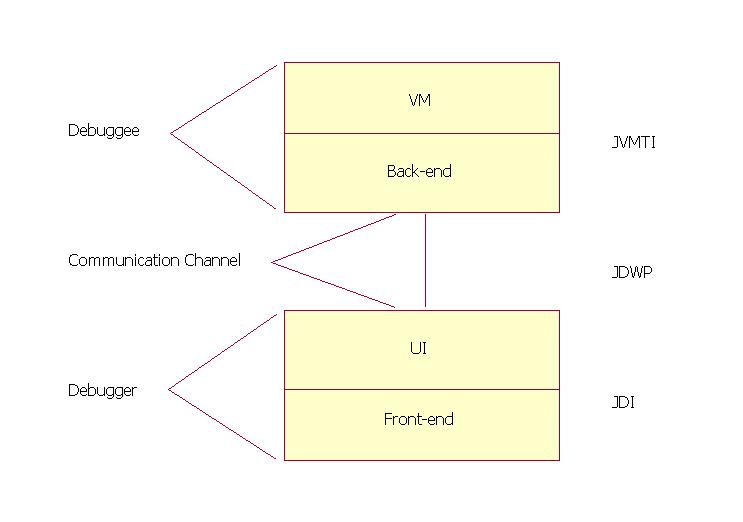
JPDA stands for Java Platform Debugger Architecture. It’s a multi-layered debugging architecture which enables a tool developer to easily and effectively develop a debugger application which will run across platform, VM implementations and JDK versions.
Note: This discussion is for Java SE 5.0!

Architecture
JPDA consists of two interfaces (JVMTI and JDI), a protocol (JDWP) and two software components which tie them together (back-end and front-end). For the sake of simplicity JDWP is referred as an interface only.

Components
Debuggee
  • The debuggee is the process being debugged; it consists of the (java) application being debugged, the VM running the application and the back-end of the debugger.
  • The back-end of the debugger is responsible for communicating requests from the debugger front-end to the debuggee VM and for communicating the response to these requests (including desired events) to the front-end. The back-end communicates with the front-end over a communications channel using the Java Debug Wire Protocol (JDWP). The back-end communicates with the debuggee VM using the Java Virtual Machine Tool Interface (JVMTI).
The communications channel
  • The communications channel is the link between the front and back ends of the debugger. It consists of two mechanisms: a connector and a transport.
  • A connector is a JDI object that is the means by which a connection is established between the front and back-ends. JPDA defines three types of connectors:
    • Listening connectors: The front-end listens for an incoming connection from the back-end
    • Attaching connectors: The front-end attaches to an already running back-end.
    • Launching connectors: The front-end actually launches the java process that will run the debuggee code and the back-end.
  • A transport is the underlying mechanism used to move bits between the front-end and the back-end. The transport mechanism used is unspecified; possible mechanisms include: sockets, serial lines, and shared memory. However, the format and semantics of the serialized bit-stream flowing over the channel is specified by the Java Debug Wire Protocol (JDWP).
Debugger
  • The debugger front-end implements the high-level Java Debug Interface (JDI). The front-end uses the information from the low-level Java Debug Wire Protocol (JDWP) and gives to UI to display in user understandable and acceptable format.

Interfaces
Java Virtual Machine Tool Interface (JVMTI)
A native interface implemented by the VM. Defines the services a VM must provide for debugging. Includes requests for information (e.g. current stack frame), actions (e.g. set a breakpoint), and notification (e.g. when a breakpoint has been hit).

Java Debug Wire Protocol (JDWP)
Defines the format of information and requests transferred between the debuggee process and the debugger front-end. It does not define the transport mechanism (e.g. socket, serial line, shared memory etc). The specification of the protocol allows the debuggee and debugger front-end to run under separate VM implementations and/or on separate platforms.

Java Debug Interface (JDI)
A 100% Java interface implemented by the front-end. Defines information and requests at a user code level. While debugger implementers could directly use the Java Debug Wire Protocol (JDWP) or Java Virtual Machine Tool Interface (JVMTI), this interface greatly facilitates the integration of debugging capabilities into development environments.

How it works
Each interface provides are two types of activities: requests and events. Requests originate on the debugger side and include queries for information, setting of state changes in the remote VM/application, and setting of debugging state. Events originate on the debuggee side and denote change of state in the remote VM/application.

Example of request

  • A user clicks on a local variable in a stack view in an IDE, requesting its value. The IDE uses the JDI to get the value; in particular it calls the getValue method on the stack frame.
    E.g. stackFrame.getValue(localVariable).
    Where stackFrame is a com.sun.jdi.StackFrame and localVariable is a com.sun.jdi.LocalVariable.
  • The front-end then sends this query over a communications channel (let's say a socket) to the back-end running in the debuggee process. It sends it by formatting it into a byte stream in accordance with the JDWP. In particular, it sends a GetValues command (byte value: 1) in the StackFrame command set (byte value: 16), followed by the thread ID, frame ID, etc.
  • The back-end deciphers the byte-stream and sends the query off to the VM through the JVMTI. In particular, let's say the requested value is an integer, the following JVMTI function call is made:
    error = jvmti->GetLocalInt(frame, slot, &intValue);
  • The back-end sends back across the socket, a response packet, which will include the value of intValue, and which will be formatted according to JDWP.
  • The front-end deciphers the response packet and returns the value as the value of the getValue method call. The IDE then displays the value.
Example of event
  • The virtual machine sends an event (say break point occurred) across the JVMTI interface. In particular, it calls the event handling function passing the breakpoint.
  • The back-end has set the event handling function to be:
    static void Breakpoint(jvmtiEnv *jvmti_env, JNIEnv* jni_env, jthread thread, jmethodID method, jlocation location) { ... }
    This back-end function starts a chain of activity which filters the event to see if it is interesting, queues it, and sends it across the socket in the JDWP format defined for breakpoint events.
  • The front-end decodes and processes the event, eventually generating a JDI event. In particular, the JDI event is exposing it as a com.sun.tools.jdi.event.BreakpointEvent. The IDE then gets the event by removing it from the event queue.
    E.g. eventQueue.remove()
    Where eventQueue is a com.sun.jdi.event.EventQueue.
  • The IDE will probably update its displays by making many query calls across the JDI.
Reference Implementation
  • In the reference implementation of JPDA by Sun , JVMTI is implemented by the Java HotSpot VM and the client is the reference implementation of the back-end, supplied as a native shared library (jdwp.so, jdwp.dll), which is shipped with the JDK; which implement JVWP.
  • The reference implementation of the back-end (above) provides the debuggee side of JPDA architecture, and the reference implementation of the front-end (a Java programming language component of the JDK, located in tools.jar and jdb ) provides the debugger side; which implements JDI.

Examples
  1. Start a program which will listen for debug requests using socket as transport on port 8000. Use jdb to connect and debug it.
    C:\> java -agentlib:jdwp=transport=dt_socket,server=y,address=8000,suspend=y Hello Listening for transport dt_socket at address: 8000
    C:\> jdb -connect com.sun.jdi.SocketAttach:hostname=localhost,port=8000
    Set uncaught java.lang.Throwable
    Set deferred uncaught java.lang.Throwable
    Initializing jdb ...
    > VM Started: No frames on the current call stack main[1]

  2. Start a program which will listen for debug requests using shared memory as transport. Use jdb to connect and debug it.
    C:\> java -agentlib:jdwp=transport=dt_shmem,server=y,address=mymem,suspend=y Hello Listening for transport dt_shmem at address: mymem
    C:\> jdb -attach mymem Set uncaught java.lang.Throwable
    Set deferred uncaught java.lang.Throwable
    Initializing jdb ...
    VM Started: > No frames on the current call stack main[1]

  3. Launch a program using jdb and debug it.
    C:\> jdb Hello Initializing jdb ... >
References
http://java.sun.com/products/jpda/doc/index.html
http://java.sun.com/products/jpda/

Thursday, July 28, 2005

Manish’s story of small boy and his color box

This story has been told to me by Manish… I found this very helpful as a young programmer/designer

Scene1:
One day a dad gives a brand new camlin color box to his son as a gift. The small boy becomes very happy by seeing 12 fresh colors in the box and asks dad “Which picture shall I draw first?” Dad said, “Son, go ahead with my picture!” Without wasting a single minute the boy takes pencil and draws his dads picture and paints it. He was so excited that was willing to use all 12 brand new colors; so he made dads face red, one arm blue other black, shirt green, pant brown and so on…

Scene2:
Some other day some other dad gives a brand new camlin color box to his son as a gift. The small boy becomes very happy by seeing 12 fresh colors in the box and asks dad “Which picture shall I draw first?” Here again dad said, “Son, go ahead with my picture!” But this boy thinks for a while; takes pencil and draws his dads picture and paints it. He thinks on body color and create the body color shade by mixing red and some other color, paints all body parts with that color; paints blue shirt and black pant. Thus he uses only 3-4 colors from his new color box!


Moral of the story – As a programmer/designer we have a lot of technologies in front of us, but this does not mean that we have to use all these; lets think/study them, see which ones our application really demands and use those or combination of those only and be the second clever boy!