Thursday, October 25, 2007

12th hour Kojagiri Item

No, no. There is no typo in the subject of this write-up! Keep reading you will understand it. This Kojagiri night I was expecting the typical doodh celebration at D-9. When I came home there was nothing like this. The reason from Birjoo was: “Doodh pilyanantar zop yete ani sakali lawakar jag yet nahi!” Okay no celebrations this time.


Around 11:30 PM I received an SMS from Aparna telling that how they are celebrating the Kojagiri. That’s it. It triggered me. Birjoo told me the probable place where I can get doodh. Of course if there is a will there is a way. Though Birjoo said that if there is a will there is a way but there will not be (open) dukan. Around 11:45 PM I was outside that dukan. But now there is a will there is a way and there is an open dukan but there is no doodh. What to do? Simple! We regularly drink proper proper milk from Chitale milk bag this time we will do something different: we will celebrate Kojagiri with Nestle milk powder! Done!


Next one hour was of full fun celebrating this dynamic Kojagiri. Till the end Suyash was unaware of whether the doodh is a proper proper doodh or a milk powder. This will give you an idea of our quality celebrations (or quality of Nestle product ;-))

IndicThreads.com Conference On Java Technology

Last week we attended a (probably) first independent java conference in pune organized by Rightrix. The conference was held at Symbiosis Infotech Campus at Hinjewadi, Pune.

DR sent 5 people from Aftek viz Me, Smita N, Preeti, Ashwin and Meenal. We all had good time over last 2 days, meeting famous personalities and learning techi stuff from them. I will write in brief about these two days of conference in my next blogs.

One more thing: As we went to Hinjewadi what’s the first thing that we did? Correct we went to see the Afteks proposed development centre! And the (breaking) good news for all of us is: Yes we have seen some giant bulldozers and cranes working over there! So be ready to get shifted to Hinjewadi within next two years! (Disclaimer: It’s my guess and there is nothing official about it ;-) )

So be tuned to cover the next two techi days!

Sunday, September 16, 2007

Ganeshotsav @ “D-9 Bal Tarun Mitra Mandal”!

Yes … don’t get zapped neither reading the title of this blog nor by entering my apartment at kotharud!
Yes … for the first time in history of D-9 ... its our apartment number :) ... and even in the history of my residence at pune; we are celebrating Ganeshotsav! What I am going to write here is … how dramatically all this started and all the fun that we are having with our Ganapati …

Some time in middle of august I, Suyash and Birjoo were talking about Suyashs trip to Leh … and I don’t know how I came up with the idea of “Ganapati Basawane” at our apartment! And as usual the idea got faded out with the time. Suyash went to Leh … we got busy in our day to day software industry stuff. But in office I was talking about “Ganapati Basawane” and how we used to do this at Nagar ... my native place etc etc.

On the say before Ganesh Chaturthi I was in full swing about “Ganapati Basawane” at our apartment … at least I was talking about this in office. When I came to home I shared this with Birjoo but his reaction was not so +ve :( That’s it. Story ended. (Basically his concern was whether we will be able to manage this or not … which was very true).

Next day … as usual we wake up late … went to Charminar for tea. (Charminar is nothing but a “chay ki tapari” near shivaji putala … the actual name of this tapari is Shivneri but we call it Charminar! Why? Watch “The Angrez”!). I told Birjoo that I am going to Nagar (read this as Ahmednagar hence after :) ) as my Mom called me up for Ganesh Chaturthi. At the same time I received sms from Trupti D., “Basawale ka ganapati baapa?”. My oblivious reply was, “Nahi na … Ghari bolawale aahe … Aata gharich basawato ganapati bappa!” I was all set to go to Nagar on bike …packed the bag … pulled over the jacket … and I am ready!


Suddenly we recalled that we have to pay house rent to our landlord. Birjoo said lets go to ICICI ATM and pay the cash to landlord. We went to our landlords place. I asked Birjoo to wait in parking coz I was supposed to come within next 5 mins.

And hence after the actual drama began ….

I went to my landlord … he welcome me with a Ganeshji ka prashad asked me to wait and have prashad. We were talking about the “Ganapati Basawane” at his place etc etc. My 5 mins got over and so Birjoo came up … Yes usake naseeb main bhi Ganeshji ka prashad tha :) After paying the rent we came to D-9s parking … I said bye to Birjoo as I was going to Nagar on my recently serviced bike: pulsar 150!

Suddenly Birjoo said, “Ghara-malakachya ghari gelyawar, aka seconda sathi mala watale ki apan ganapati basawayala pahije … ” And my reaction was, “tu hech parat akada bolala tar mi bike park karun ganapati basawayala tayar aahe”. And and … you can guess what would have happened next …

I called up Mom; asked her whether we should go ahead with “Ganapati Basawane”. She said we can … just make sure that you do everything with lot of devotion and discipline. We said okay. I prepared a list of items to purchase … starting from table-top, cloth, niranjani, kalash to ganapati decorations. And we started our shopping …. (We love this)

So finally around 5:00 we started the “Ganapati Basawane” even … and … till 6:00 we were done with our first ever “Ganesh Pratishthapana”!!! As usual it was very dramatic but very satisfying. Today I really believed it all happened like “We prayed lord Ganesha and asked that whether we should go ahead with Ganesh Pratishthapana and he said yes go ahead” :)

Now for next 10 days you will see various exciting events happening at D-9: the aratis, decorations, competitions and many more cool events … so stay tuned :)


(I have uploaded couple of snaps here this will give you a little idea about the excitement we had :) ... video will be uploaded soon ;-))

Ganapati Bappa Morya ! Mangal Murti Morya ! !

Saturday, May 19, 2007

Demophobia

Demophobia. They say its "Fear of crowds". I say its fear of Demo.
Why one should be afraid of Demo ? Rather who should be afraid of Demo. I will say everyone around Demo.
Hey come on Demo is not a Tiger or Dinosaur or even not a stinking sox.
Actually yes ?
  • We in software industry keep giving Demos to various people; client, directors, managers, venture capitalists ... Everyone is afraid of this : We as well as They.
    • My manager asks me to setup a Demo for our Director. I and my colleagues all work hard and hard, we don't sleep the night before Demo and the next day the Director say he don't want this.
    • Next time my manager work even harder (of course this means we work hard ;-) ) and we give so called a controlled Demo. Wow ! this time it worked. After this what? Now its our so called moral responsibility to convert the Demo to a all time running, bug free system.
    • After Demo what ? My manager start preparing for next Demo. Hey man what about that bug free system that we were supposed to build after first Demo? don't know.
    • After 4 months. We have a 15MB of code for 4 different Demos! which will never work together a an integrated product.

Monday, December 18, 2006

JPDA Tutorial

Introduction
JPDA stands for Java Platform Debugger Architecture. It’s a multi-layered debugging architecture which enables a tool developer to easily and effectively develop a debugger application which will run across platform, VM implementations and JDK versions.
Note: This discussion is for Java SE 5.0!

Architecture
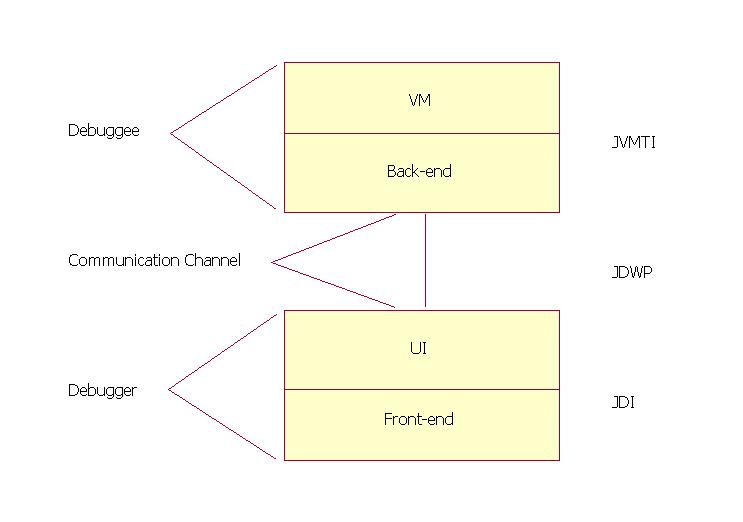
JPDA consists of two interfaces (JVMTI and JDI), a protocol (JDWP) and two software components which tie them together (back-end and front-end). For the sake of simplicity JDWP is referred as an interface only.

Components
Debuggee
  • The debuggee is the process being debugged; it consists of the (java) application being debugged, the VM running the application and the back-end of the debugger.
  • The back-end of the debugger is responsible for communicating requests from the debugger front-end to the debuggee VM and for communicating the response to these requests (including desired events) to the front-end. The back-end communicates with the front-end over a communications channel using the Java Debug Wire Protocol (JDWP). The back-end communicates with the debuggee VM using the Java Virtual Machine Tool Interface (JVMTI).
The communications channel
  • The communications channel is the link between the front and back ends of the debugger. It consists of two mechanisms: a connector and a transport.
  • A connector is a JDI object that is the means by which a connection is established between the front and back-ends. JPDA defines three types of connectors:
    • Listening connectors: The front-end listens for an incoming connection from the back-end
    • Attaching connectors: The front-end attaches to an already running back-end.
    • Launching connectors: The front-end actually launches the java process that will run the debuggee code and the back-end.
  • A transport is the underlying mechanism used to move bits between the front-end and the back-end. The transport mechanism used is unspecified; possible mechanisms include: sockets, serial lines, and shared memory. However, the format and semantics of the serialized bit-stream flowing over the channel is specified by the Java Debug Wire Protocol (JDWP).
Debugger
  • The debugger front-end implements the high-level Java Debug Interface (JDI). The front-end uses the information from the low-level Java Debug Wire Protocol (JDWP) and gives to UI to display in user understandable and acceptable format.

Interfaces
Java Virtual Machine Tool Interface (JVMTI)
A native interface implemented by the VM. Defines the services a VM must provide for debugging. Includes requests for information (e.g. current stack frame), actions (e.g. set a breakpoint), and notification (e.g. when a breakpoint has been hit).

Java Debug Wire Protocol (JDWP)
Defines the format of information and requests transferred between the debuggee process and the debugger front-end. It does not define the transport mechanism (e.g. socket, serial line, shared memory etc). The specification of the protocol allows the debuggee and debugger front-end to run under separate VM implementations and/or on separate platforms.

Java Debug Interface (JDI)
A 100% Java interface implemented by the front-end. Defines information and requests at a user code level. While debugger implementers could directly use the Java Debug Wire Protocol (JDWP) or Java Virtual Machine Tool Interface (JVMTI), this interface greatly facilitates the integration of debugging capabilities into development environments.

How it works
Each interface provides are two types of activities: requests and events. Requests originate on the debugger side and include queries for information, setting of state changes in the remote VM/application, and setting of debugging state. Events originate on the debuggee side and denote change of state in the remote VM/application.

Example of request

  • A user clicks on a local variable in a stack view in an IDE, requesting its value. The IDE uses the JDI to get the value; in particular it calls the getValue method on the stack frame.
    E.g. stackFrame.getValue(localVariable).
    Where stackFrame is a com.sun.jdi.StackFrame and localVariable is a com.sun.jdi.LocalVariable.
  • The front-end then sends this query over a communications channel (let's say a socket) to the back-end running in the debuggee process. It sends it by formatting it into a byte stream in accordance with the JDWP. In particular, it sends a GetValues command (byte value: 1) in the StackFrame command set (byte value: 16), followed by the thread ID, frame ID, etc.
  • The back-end deciphers the byte-stream and sends the query off to the VM through the JVMTI. In particular, let's say the requested value is an integer, the following JVMTI function call is made:
    error = jvmti->GetLocalInt(frame, slot, &intValue);
  • The back-end sends back across the socket, a response packet, which will include the value of intValue, and which will be formatted according to JDWP.
  • The front-end deciphers the response packet and returns the value as the value of the getValue method call. The IDE then displays the value.
Example of event
  • The virtual machine sends an event (say break point occurred) across the JVMTI interface. In particular, it calls the event handling function passing the breakpoint.
  • The back-end has set the event handling function to be:
    static void Breakpoint(jvmtiEnv *jvmti_env, JNIEnv* jni_env, jthread thread, jmethodID method, jlocation location) { ... }
    This back-end function starts a chain of activity which filters the event to see if it is interesting, queues it, and sends it across the socket in the JDWP format defined for breakpoint events.
  • The front-end decodes and processes the event, eventually generating a JDI event. In particular, the JDI event is exposing it as a com.sun.tools.jdi.event.BreakpointEvent. The IDE then gets the event by removing it from the event queue.
    E.g. eventQueue.remove()
    Where eventQueue is a com.sun.jdi.event.EventQueue.
  • The IDE will probably update its displays by making many query calls across the JDI.
Reference Implementation
  • In the reference implementation of JPDA by Sun , JVMTI is implemented by the Java HotSpot VM and the client is the reference implementation of the back-end, supplied as a native shared library (jdwp.so, jdwp.dll), which is shipped with the JDK; which implement JVWP.
  • The reference implementation of the back-end (above) provides the debuggee side of JPDA architecture, and the reference implementation of the front-end (a Java programming language component of the JDK, located in tools.jar and jdb ) provides the debugger side; which implements JDI.

Examples
  1. Start a program which will listen for debug requests using socket as transport on port 8000. Use jdb to connect and debug it.
    C:\> java -agentlib:jdwp=transport=dt_socket,server=y,address=8000,suspend=y Hello Listening for transport dt_socket at address: 8000
    C:\> jdb -connect com.sun.jdi.SocketAttach:hostname=localhost,port=8000
    Set uncaught java.lang.Throwable
    Set deferred uncaught java.lang.Throwable
    Initializing jdb ...
    > VM Started: No frames on the current call stack main[1]

  2. Start a program which will listen for debug requests using shared memory as transport. Use jdb to connect and debug it.
    C:\> java -agentlib:jdwp=transport=dt_shmem,server=y,address=mymem,suspend=y Hello Listening for transport dt_shmem at address: mymem
    C:\> jdb -attach mymem Set uncaught java.lang.Throwable
    Set deferred uncaught java.lang.Throwable
    Initializing jdb ...
    VM Started: > No frames on the current call stack main[1]

  3. Launch a program using jdb and debug it.
    C:\> jdb Hello Initializing jdb ... >
References
http://java.sun.com/products/jpda/doc/index.html
http://java.sun.com/products/jpda/